Why Creators Use Lovense — The Real Reason
Lovense became the dominant toy for adult content creators for a specific and practical reason: the toys respond to viewer tips automatically. On platforms like Chaturbate, a viewer tips 50 tokens and the toy vibrates for 5 seconds — no creator interaction required. The toy becomes a monetization mechanism that runs in parallel with content creation rather than interrupting it.
This is the key insight that new creators often miss. The toy is not just a product you use on camera — it is a feedback loop between fan spending and creator experience. When viewers see an immediate, physical result from their tip, they tip more often and in larger amounts. The toy makes the transaction feel participatory rather than passive.
Beyond the automated tip integration, Lovense's fan-control system lets creators sell direct control access — a subscriber pays for a time-limited link that gives them full real-time control of the toy. This can command premium pricing ($30–100+ per session depending on audience) and creates a genuinely unique experience that no amount of regular content can replicate. A subscriber who has controlled your toy has a different relationship with your content than one who has only watched.
The secondary reason creators use Lovense over cheaper alternatives is reliability. A $40 no-name Bluetooth vibrator that disconnects during a stream is more damaging to audience trust than no toy at all. Lovense has spent 12 years building infrastructure specifically for this use case. Connectivity issues happen but are much rarer than with alternatives. When you are earning from live streaming, reliability is worth paying for.
How Much Can You Earn with Lovense Integration?
Let me be honest about what I know and what I do not know here. I am not a cam creator myself. The income data below comes from creator community reports on Reddit (r/CamGirlProblems, r/OnlyFansCreators), forum discussions on Chaturbate's community boards, and publicly available creator interviews. I will not invent specific figures, but I can share the honest ranges that creators report.
Realistic income impact of Lovense integration
- Chaturbate tip frequency increase: Creators consistently report 20–40% more tip events per hour when tip-activated toys are running vs content-only streams. The toy gives viewers a concrete action to take.
- OnlyFans fan control pricing: 30-minute control links typically price at $25–50. 1-hour sessions: $40–80. Top-tier creators with large subscriber bases report $100–300+ per control session with exclusivity pricing.
- Chaturbate token revenue: On Chaturbate, tip-vibration menus where 100–500 tokens trigger specific patterns generate consistent passive token flow during streams. Established models report this adds 20–60% to base hourly earnings.
- Subscription tier upsell: Creators who use fan control access as a subscription tier feature report that 5–15% of subscribers upgrade to tiers that include control access, representing a significant revenue multiplier on the base subscription.
What these numbers do not account for: none of this works without an established audience. Adding Lovense to a new account with 50 followers will not generate the returns a 10,000-subscriber creator sees. The toy amplifies existing audience engagement — it does not create it from nothing. The investment in the toy makes sense once you have a follower base that is actively tipping or subscribing.
The minimum viable setup for a new creator: one Lush 4 or Lush 3, the free Lovense Remote app, and a single platform (Chaturbate is recommended for new creators specifically because the automated tip integration requires no learning curve). Once you understand your audience and what they respond to, expand to OnlyFans fan control as a premium offering.
Platform Deep Dive: Chaturbate vs Stripchat vs OnlyFans vs Fansly
Each platform has a different relationship with Lovense, different audience characteristics, and different monetization structures. The right platform depends on your content style, audience preferences, and how you want to monetize the toy integration.
Chaturbate — Best for Automated Tip-to-Toy
Chaturbate has the deepest, most mature Lovense integration of any platform. Viewer tips directly trigger toy vibrations in real time — the tip amount determines the vibration duration and intensity based on levels you configure in broadcast settings. No third-party software, no manual action from you. A viewer tips 25 tokens, sees the on-screen countdown, and watches the live reaction. This feedback loop is what makes Chaturbate the highest-earning platform for many Lovense-using creators.
Lovense setup on Chaturbate: Broadcaster Settings → Interactive Toy → Connect Lovense. Configure tip levels (e.g., 10 tokens = 3 seconds, 50 tokens = 10 seconds at medium, 200 tokens = 15 seconds at maximum). The configuration takes under 5 minutes and is instantly visible to viewers in the stream tip menu.
Audience profile: Predominantly male, tip-oriented, respond well to gamification. Token menus with escalating tip levels work extremely well here. Viewers will repeatedly tip the same amount to trigger a specific pattern they enjoy — name your patterns accordingly in the app.
Honest limitations: 50% revenue split is lower than OnlyFans (80%). The free content model means you are always competing for attention. Chaturbate viewers are experienced with the format and will compare your setup to established models. A suboptimal stream quality or toy reliability issues will hurt retention.
Stripchat — Best Alternative to Chaturbate
Stripchat has native Lovense integration comparable to Chaturbate and a higher base revenue share (60–80% depending on tier). The platform has grown significantly since 2022 and now rivals Chaturbate in overall traffic for some demographics. The Lovense integration works the same way — tip amounts trigger toy vibrations automatically in broadcast settings.
Key advantage over Chaturbate: Higher creator revenue share and a smaller but more curated audience that some creators find generates higher per-viewer earnings. Stripchat also integrates with VR content, which is a growing niche.
Honest limitations: Lower absolute traffic than Chaturbate means fewer viewers per stream for new creators. For established creators, the higher revenue split often makes Stripchat more profitable per viewer than Chaturbate despite the lower total audience size.
OnlyFans — Best for Premium Fan Control Revenue
OnlyFans has no native Lovense integration — tip-to-toy automation does not exist here. Instead, creators use the Lovense fan-control-link system: generate a time-limited link, DM it to a paying subscriber, they open the link and get real-time control of your toy from their phone. This is more work than Chaturbate's automated setup, but the economics are different.
OnlyFans's 80% revenue share and subscriber-based model means the fan-control link can be a premium paid product rather than a free perk bundled with tip tokens. A $40 fan-control session on OnlyFans earns you $32. The same on Chaturbate equivalent (in tokens) earns approximately $20. The per-session economics favor OnlyFans for creators who can develop and sell premium experiences.
Best strategy for OnlyFans: Use fan control links as a subscription tier feature or as sold content (a purchasable add-on to your subscription). Do not give unlimited access away — price it as the premium experience it is. The exclusivity and personalization of "this person specifically is controlling this" commands higher pricing than automated tip vibrations.
Fansly — Growing Alternative to OnlyFans
Fansly operates similarly to OnlyFans for Lovense integration — manual fan control links rather than native automation. The revenue split is the same 80%. Fansly's key differentiator is its tiered subscription system, which some creators find more flexible for structuring Lovense access at different price points. The platform has grown since 2022 and is worth considering as a secondary platform alongside OnlyFans.
Who should use Fansly: Creators who want subscription tier flexibility for Lovense access pricing, or those building a secondary audience beyond OnlyFans. The Lovense integration experience is essentially identical to OnlyFans.
Platform comparison summary
| Platform | Lovense Integration | Revenue Split | Best For | Setup Difficulty |
|---|---|---|---|---|
| Chaturbate | Native (automated) | 50% | Volume/exposure | 5 min |
| Stripchat | Native (automated) | 60–80% | Better per-viewer | 5 min |
| OnlyFans | Fan control (manual) | 80% | Premium sessions | Moderate |
| Fansly | Fan control (manual) | 80% | Tier flexibility | Moderate |
| CamSoda | Native (automated) | 55% | Niche audience | 5 min |
Best Lovense Toys for Creators — Full Reviews
Not every Lovense toy is equally suited for content creation. The key creator-specific factors are battery life (you cannot have a toy die mid-stream), camera visibility (viewers need to see the toy is active), discretion for background use, and reliability of the Lovense app connection. Here are the four toys that work best, in order of recommendation.
1. Lovense Lush 4 — Best Overall for Streaming
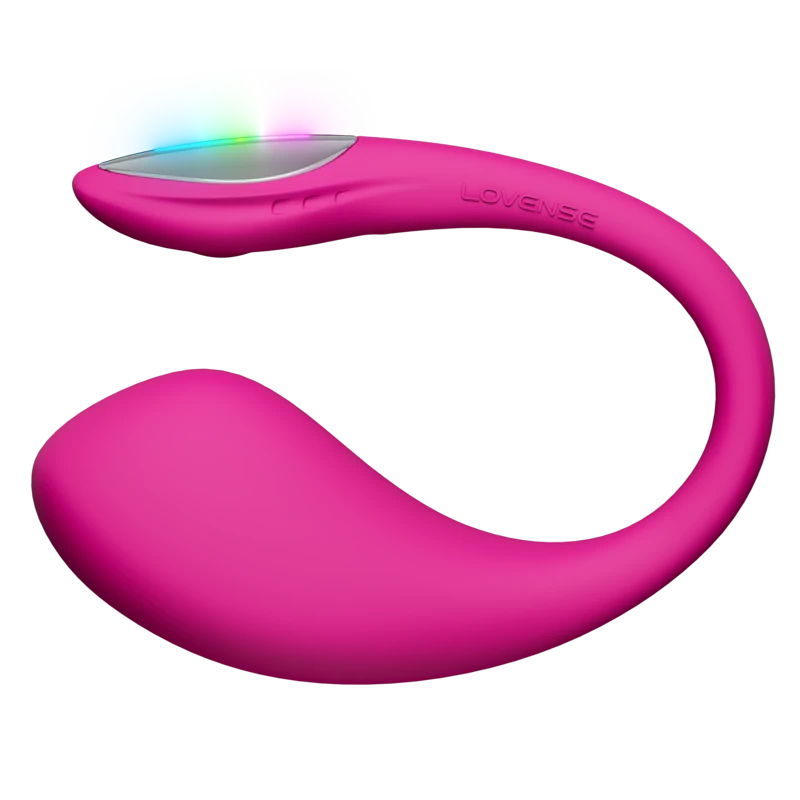
The Lush 4 is the most popular Lovense toy for content creators, and its advantages for streaming are specific and practical rather than generic. Let me go through them in order of importance.
The LED tail is a deliberate camera feature. The Lush 4's tail glows purple when active and changes color with vibration intensity — purple at low, bright pink at high. This is not a gimmick: it is a visual confirmation for viewers that their tip worked. On Chaturbate, where the tip feedback loop is the primary monetization mechanism, a visible physical reaction (both the creator's response and the visible toy activity) is the most powerful thing you can show viewers. Creators who switched from Lush 3 to Lush 4 specifically for the LED report that viewers comment on it frequently and tip to trigger specific color changes.
Six-hour battery is the minimum viable for streaming. A three-hour stream with setup and breakdown runs close to the battery limits of shorter-life toys. The Lush 4's 6-hour battery with rapid charge (80% in 52 minutes) means you can run back-to-back sessions without dead-toy anxiety. For creators doing multiple sessions per day — common on platforms like Chaturbate where morning and evening streams target different time zones — the rapid charge between sessions is essential.
Wearable design means you can do anything else while the toy is active. This is underappreciated. A handheld toy requires one hand and limits movement. A wearable G-spot egg means you can dance, cook, do other activities, talk to camera — anything — while viewers control the toy. The multi-tasking capability is a meaningful content advantage.
Creator-specific considerations: The tail is visible under thin clothing — account for this in your wardrobe choices. The G-spot positioning requires a break-in period to find the optimal placement for consistent stimulation during activity. Some creators find the vibration noise audible on a sensitive microphone at high intensity — position your mic accordingly or use the Lovense Webcam 2 with its AI noise canceling.
Pros (creator-specific)
- LED tail visible on camera — enhances tip loop
- 6h battery — sufficient for full streaming days
- Rapid charge — back-to-back sessions without delays
- Wearable — hands-free during any content type
- Most mature fan-control app integration
- IPX7 — safe for shower/bath content
Cons (creator-specific)
- $129 — highest price in the wearable egg category
- Tail slightly visible under thin fabric
- Vibration audible on sensitive microphones at max intensity
- G-spot positioning requires adjustment for consistent results
Creator Verdict: Lush 4
The default recommendation for any creator adding Lovense to their setup. The LED, battery, and rapid charge make it the most complete streaming toy available. If you are starting out, the Lush 3 at $99 is a reasonable alternative until you know how much you will use it — but the Lush 4's features are genuinely valuable for active streamers.
2. Lovense Ferri — Best for Discreet and All-Day Use
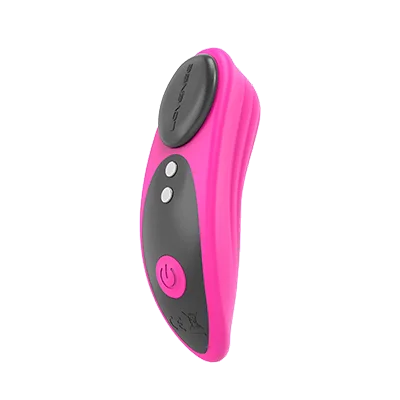
The Ferri is the Lovense toy you use when you want zero visible evidence that you are wearing a vibrator. Magnetic attachment to any underwear with no tail, no cord, no external indicator. At $89 it is $40 cheaper than the Lush 4. The Quiet rating of 4.1 means it is effectively inaudible during normal conversation — important for IRL content or streams where you want the toy present but not noticed.
For creator use, the Ferri's primary application is "always-on" streaming where the toy stays active as a background element. Viewers know you are wearing it; you are not featuring it as the center of content. It is also the best option for hybrid content — live streams where you are doing cooking, gaming, or other activities with the toy running in the background responding to tips, without the toy being visually prominent.
The Ergonomics rating of 5.0 is the highest of any Lovense toy and reflects the Ferri's core purpose — it is genuinely comfortable for extended wear. The magnetic design means it does not shift position during movement the way an egg vibrator can.
Creator-specific limitations: No LED visual feedback — viewers cannot see the toy is active from the outside. This reduces the visual feedback loop that makes the Lush 4 so effective for tip motivation. The Ferri works better for content where the creator's verbal and physical response is the feedback, not a visible toy. Battery life (approximately 4 hours at medium intensity) is shorter than the Lush 4, so battery management matters more.
Pros (creator-specific)
- $89 — most affordable wearable Lovense option
- No visible tail or indicator — works under any outfit
- Quiet 4.1 — inaudible on-mic during streams
- Ergonomics 5.0 — comfortable for all-day use
- Full LDR and fan-control app support
- IPX7 waterproof
Cons (creator-specific)
- No LED — no visual tip feedback for viewers
- Shorter battery than Lush 4 (~4h)
- Clitoral-only stimulation — different sensation profile than egg
- Less dramatic visible response for camera content
Creator Verdict: Ferri
Best when discretion is more important than camera visibility. Ideal as a second toy alongside the Lush 4 — use the Lush 4 for featured content where the toy is part of the visual experience, and the Ferri for always-on background sessions. The $89 price makes it a reasonable starter toy if you are testing the creator market before committing to the Lush 4.
3. Lovense Domi 2 — Best for Maximum Visible External Intensity
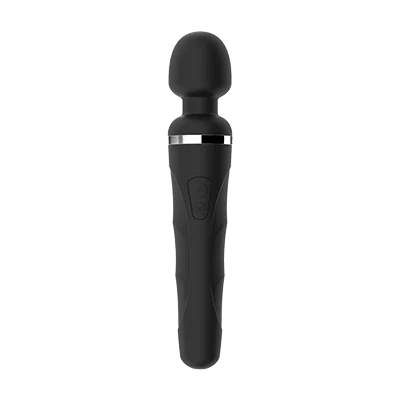
The Domi 2 is fundamentally different from every other toy on this list: it is corded. This sounds like a limitation but for streaming it is a significant advantage — the toy never dies. No battery management, no power anxiety, no toy dying at a critical moment in a live stream. Plug it in, it runs indefinitely.
The power advantage is equally significant. Power rated 5.0/5 by buyers. Orgasm rated 4.8/5 — the highest in the Lovense range and tied only with the Solace Pro. The Domi 2 delivers wand-style external clitoral stimulation at an intensity level that handheld wand users typically find very effective. On camera, the physical response to maximum-intensity Domi 2 stimulation is more visually pronounced than most other toys — a relevant consideration for content where the visible physical response is part of the experience.
The tradeoff is portability and positioning. The cord limits movement. The handheld form factor means it requires one hand. This makes the Domi 2 best for stationary content — reclined or sitting positions where movement is not required. For creators who do primarily this type of content, the Domi 2 may be a better primary toy than the Lush 4. For creators who move around during streams, it is a complement rather than a replacement.
Pros (creator-specific)
- Corded — never runs out of power mid-stream
- Highest power rating in Lovense range (5.0)
- Highest orgasm rating in range (4.8)
- Visible on camera — handheld toy is clearly part of the content
- Full fan-control and tip-integration support
- $109 — competitive pricing for power level
Cons (creator-specific)
- Corded — limits movement, visible cord on camera
- Handheld — requires one hand, not wearable
- Not discreet — cannot be used under clothing
- External only — different experience than internal toys
Creator Verdict: Domi 2
The best choice for creators who do primarily stationary content and want the highest possible intensity without battery management concern. The Domi 2's power rating and corded design make it the most reliable high-intensity option for streaming. Use it as a complement to the Lush 4 for variety rather than as a standalone replacement unless your content style specifically suits a handheld wand format.
4. Lovense Nora — Best for Visible Internal Use

The Nora's rabbit design is clearly visible on camera — viewers can see the toy and its physical motion (the rotating head, the external arm), which increases engagement compared to the Lush 4's wearable design where the toy is mostly hidden. For content where the toy is meant to be the visual focus rather than a wearable background element, the Nora's visibility is an advantage.
The dual-motor design (rotating G-spot arm + clitoral vibrator) gives a remote controller two independent elements to work with — they can adjust the rotation speed of the internal arm separately from the external vibration intensity. This creates a richer control experience for fans who have purchased control access, which can justify higher pricing for fan-control sessions.
At $99, the Nora is priced identically to the Lush 3. The battery life is comparable (approximately 5 hours). The main limitation for creator use is that the Nora cannot be worn hands-free during movement — it requires a supported position, limiting the content types where it works naturally.
Pros (creator-specific)
- Visually prominent on camera — toy is clearly part of the content
- Dual motor = richer control experience for fans
- Highest orgasm rating in rabbit category (4.7)
- IPX7 — shower/bath content safe
- $99 — same price as Lush 3
Cons (creator-specific)
- Not wearable hands-free during activity
- Requires supported position — limits content mobility
- Rotation mechanism is audible — factor in mic placement
- Less suitable for "background toy" content style
Creator Verdict: Nora
Best for creators who feature the toy visually as the content focus. The dual-motor control also makes fan-control sessions more interesting and potentially more valuable to charge premium for. Not ideal as a wearable background toy — use the Lush 4 or Ferri for that. Use the Nora for dedicated, toy-focused content sessions.
Equipment Setup: Camera, Lighting, and Streaming
The toy is one part of the setup. For Lovense to work effectively in a streaming context, the surrounding equipment matters — particularly for showing the toy's visual effects and ensuring the app connection stays stable.
Camera
Most smartphones have cameras sufficient to show the Lush 4's LED feedback clearly. For dedicated streaming, a webcam with autofocus and good low-light performance matters. The Lovense Webcam 2 ($149.99) is worth discussing specifically because it is designed for this use case:
- 4K resolution: Sufficient for any current streaming platform's maximum quality setting.
- AI auto-framing: The camera adjusts its frame automatically to keep you in shot during movement — directly relevant if you are doing active content while wearing a wearable toy.
- AI noise canceling: Reduces ambient noise including toy vibration sound that might otherwise be audible in your stream audio.
- Gesture control: You can adjust camera angle and zoom with a hand gesture while keeping both hands on content — useful for quick framing adjustments without interrupting a stream.
- Remote control: Your partner or a trusted person can adjust the camera remotely via the Lovense app — useful for setups where you cannot easily reach the camera during content.
The Lovense Webcam 2 is genuinely purpose-built for cam models. The auto-framing, noise canceling, and gesture control address specific pain points in streaming with Lovense toys. If you are already earning from streaming, the $150 investment is reasonable. If you are just starting, a decent entry-level webcam will do until the investment makes sense.
Lighting
For the Lush 4 specifically, the LED tail is most visible in dimmer lighting environments. Bright overhead lighting washes out the LED effect. Many creators use ring lights positioned to the side or below rather than directly overhead, which creates a slightly darker background that makes the LED more visible while still illuminating the creator properly. Experiment with lighting angles before streaming to find what makes the LED most visible on your specific camera.
Internet and App Setup
Run the Lovense Remote app on a separate device from your streaming device if possible. When a single device handles both the Lovense Bluetooth connection and a streaming app simultaneously, resource conflicts can cause Bluetooth drops or stream quality issues. Many creators use a phone for Lovense Remote and a PC or tablet for the streaming platform. This separation eliminates the most common source of mid-stream toy disconnections.
Use a wired internet connection for your streaming device rather than WiFi whenever possible. Wireless interference can affect both stream quality and the Lovense app's server connection. The streaming platform's connection is the highest bandwidth consumer; the Lovense app uses very little — but both benefit from a stable connection.
Always keep the Lovense Remote app in the foreground on iOS. Apple's background app management can interrupt Bluetooth communication if you switch away. On Android this is less of an issue, but keeping the app visible is good practice regardless.
Fan Control Setup for OnlyFans (Step by Step)
OnlyFans does not have native Lovense integration for automatic tip-to-vibration. Instead, you use the Lovense fan-control-link system, which is actually more flexible: a subscriber gets a personal control link for a specified time window, giving them direct real-time control of your toy. This is a premium, personalized experience that automatic tip vibration cannot replicate — and it commands premium pricing.
Step-by-step: generating a fan control link
- Open the Lovense Remote app on your phone. Ensure your toy is connected and charged.
- Tap your toy to open the control screen. Tap the share icon in the top right corner.
- Select "Share Control" from the menu.
- Configure the parameters: set a time limit (30 min, 1 hour, 2 hours, or custom). Set intensity limits if desired — you can cap the maximum vibration level the controller can reach. Enable or disable specific pattern libraries. Set whether the controller can see your battery level.
- Tap "Generate Link." A unique URL is created. This link is single-use and expires at your set time limit.
- Copy the link and DM it to your subscriber via OnlyFans messaging. They tap the link, download Lovense Remote if they do not have it, and immediately have full control of your toy for the duration you set.
- Base subscription ($X/month): Access to content. Toy may be visible in content but no direct control access.
- Mid tier ($X+15–20/month): One 30-minute control link per month included. Shows up as a weekly perk DM.
- Top tier ($X+40–60/month): Two 1-hour control sessions per month. Premium access and priority DM response.
- Pay-per-session (any tier): Additional control sessions available as paid add-ons at $25–50 per 30 minutes. DM subscribers individually or post as locked content.
This structure creates subscription upgrade incentives and provides predictable monthly income from control sessions without oversaturating access.
During a fan control session on OnlyFans
When a subscriber has an active control link, run a simultaneous voice or video call if possible — the session is more engaging for the subscriber and commands higher pricing when it includes real-time communication. Use the Lovense app's built-in video call to keep everything in one interface. Have a clear session boundary: "You have 30 minutes of control starting now" creates anticipation and urgency that makes the experience more valuable than an open-ended access link.
Set intensity limits in the link settings the first time you give someone control access — maximum 60–70% intensity rather than unlimited. This protects against jarring intensity spikes from new controllers and allows you to offer "unlimited intensity" as a premium upsell to returning subscribers.
Chaturbate Tip-to-Toy Setup (Full Instructions)
Chaturbate's Lovense integration is the most seamless of any platform. The setup takes less than 5 minutes and, once configured, runs automatically throughout your stream without requiring any manual intervention.
- Log in to Chaturbate as a broadcaster. Navigate to Broadcast Settings (accessible from your profile menu or during stream setup).
- Find the "Interactive Toy" section. Select "Lovense" from the dropdown menu.
- If streaming from a smartphone: open the Lovense Remote app and ensure your toy is connected. Chaturbate's mobile integration connects through the app automatically once both are running and logged in to the same Lovense account.
- If streaming from a PC: download the Lovense Browser Extension from lovense.com. Install it, connect your toy to the extension, then connect the extension to your Chaturbate account. This allows your toy's Bluetooth connection (via the extension on your PC) to receive tip triggers from the browser.
- Configure your tip levels. Chaturbate's interface lets you set custom token amounts for different vibration patterns. A standard starting configuration: 10 tokens = 5-second vibration at medium; 25 tokens = 10 seconds at medium; 50 tokens = 10 seconds at maximum; 100 tokens = 20 seconds at maximum; 250 tokens = 30 seconds of "Pleasure" pattern; 500 tokens = your custom signature pattern for 60 seconds.
- Name your patterns descriptively in the Lovense app before setting up Chaturbate. Pattern names appear in the tip menu — "Earthquake" is more compelling than "Pattern 7".
- Start your stream. The tip menu showing your Lovense levels is automatically visible to viewers. Viewers tip, toy responds, you react.
Advanced Chaturbate tip menu strategy
The psychology of tip menus on Chaturbate is worth understanding. Viewers have limited attention and a habitual tipping amount. Your goal is to identify the tip amount at which a specific viewer repeatedly engages and make that the most satisfying tier for them. This means:
- Do not make every tier longer duration of the same thing. Add pattern variety at different levels — the 50-token tier should feel qualitatively different from the 25-token tier, not just twice as long.
- Reserve your best custom pattern for a high tier. Viewers who tip to that level and enjoy the pattern will return specifically to see it again. It becomes your signature.
- Keep one or two tiers specifically for new viewers — low-cost (10–15 tokens) to give someone who has never tipped before a low-risk way to experience the feedback loop. First-time tippers become repeat tippers at a high rate once they experience the response.
- Update your tip menu occasionally. A viewer who has seen the same menu for 6 months loses interest. Introduce seasonal patterns, limited-time tiers, or event-specific configurations to create novelty.
Pricing Your Fan Control Link Access
Pricing fan control access is not straightforward, because the same experience has different value at different audience sizes and engagement levels. Here is a practical framework.
Understanding what you are selling
Fan control access is not just a product feature — it is an exclusive, personalized experience. The subscriber is not watching content; they are participating in it. They are causing your physical responses. This is fundamentally different from any passive content, which is why it can command premium pricing relative to regular subscription fees.
The price should reflect: the duration, the exclusivity (is it one-to-one or could multiple people have access simultaneously?), the communication included (voice call alongside control? video?), and your audience's established spending patterns.
Pricing tiers by audience type
- New creator, small audience (under 500 subscribers): 30-minute session $15–25. 1-hour session $25–40. These are introductory prices to generate reviews, repeat engagement, and audience trust. Do not undervalue long-term — you can raise prices as audience grows.
- Established creator (500–5,000 subscribers): 30-minute session $30–50. 1-hour session $50–80. Group control events (multiple subscribers share a link for a scheduled stream) at $15–25 per person. Group events allow higher total earnings at lower per-subscriber pricing.
- Top-tier creator (5,000+ subscribers): Individual 30-minute sessions $50–100+. 1-hour exclusive sessions $80–150+. Auction the control link to the highest bidder for major events. One-to-one sessions are the most premium product — price accordingly and limit availability to maintain exclusivity value.
Setting intensity limits strategically
Set control links at 70% maximum intensity as your default. Offer "full intensity" as an upsell — either at a higher price tier or as a reward for reaching a specific tip amount during the session. This creates a natural escalation within a session and prevents first-time controllers from immediately going to maximum intensity, which some creators find uncomfortable without warming up.
Session timing and scheduling
Schedule fan control sessions rather than selling them as on-demand access. "Control session available Saturday 8 PM ET — purchase before Friday midnight" creates urgency, allows you to prepare, and enables you to batch the prep work (charging toy, setting up equipment, arranging the session logistics) rather than having to be ready for an ad-hoc session at any time.
Advanced Tips from Working Creators
These are practices I have gathered from creator community discussions, interviews, and posts in adult creator forums. They go beyond the basics.
- Always charge before a session — never stream on under 50% battery. A Lush 4 at 20% battery vibrates noticeably weaker than at full charge. Viewers on Chaturbate can see when the visible response is muted — it affects tip motivation. Charge before every stream, not just when the battery is critical.
- Name your vibration patterns for your audience. In the Lovense app, save patterns with names that work in your tip menu context. On Chaturbate, viewers see pattern names when browsing tip options. Descriptive, evocative names perform better than generic ones.
- Own two toys and alternate. Rapid charge is fast but not instant. With two Lush 4s (or a Lush 4 and a Ferri), one is always charging while one is in use. This completely eliminates mid-session power management anxiety and allows same-day back-to-back sessions without delay.
- Test your setup off-stream before going live. Do a 10-minute private test of the tip-vibration integration before every stream, particularly after any app updates. Lovense app updates occasionally change connection behavior. Discovering a setup issue during a live stream is significantly worse than discovering it during a private test.
- Use the LED tail strategically in your camera framing. The Lush 4's LED is your primary visual tip feedback mechanism. Frame your camera so the tail is clearly visible when you are in position. Many creators test this with a screenshot before going live to confirm visibility.
- Fan control links are premium content — price and treat them that way. Do not give 1-hour control access away for $5 as a promo. Underpricing trains your audience to expect low prices. Start at market rate and offer promotions selectively. A first-session introductory discount is fine — unlimited permanent discount is not.
- Communicate session rules before handing over control. Tell control-link users your intensity preferences, any positions or activities you want to do/avoid, and the session end time. Setting expectations prevents awkward mid-session negotiations and creates a better experience for both of you. A better experience generates better reviews and return purchases.
- Consider the Lovense Webcam 2 after your first $500 in toy-related earnings. The AI noise canceling genuinely reduces toy sound in your audio. The auto-framing means you can move freely without going out of frame. At $150, the ROI calculation is straightforward once you are earning from streaming.
Mistakes New Creators Make with Lovense
Mistake 1: Not testing the setup before going live
The most common first-stream problem is discovering that the Lovense integration is not working properly after a stream has started. Test the tip-vibration integration privately before every stream. On Chaturbate, send yourself test tips from an alternate account. On OnlyFans, send yourself the fan control link to confirm it works.
Mistake 2: Ignoring battery management
A toy that dies mid-stream is one of the most common complaints in creator forums. The Lush 4's 6-hour battery is sufficient for most sessions, but high-intensity use drains it faster. Own two toys, use rapid charge aggressively between sessions, and always start a stream at full charge.
Mistake 3: Offering fan control too cheaply or without structure
Many new creators initially underprice fan control access out of uncertainty. This creates two problems: it attracts viewers who view cheap control access as a transactional product rather than a premium experience, and it sets a price expectation that is hard to raise later. Start at a price that reflects the genuine value of the experience.
Mistake 4: Using a single device for streaming and Lovense app
Running both the streaming platform and Lovense Remote on the same device creates resource competition that can cause Bluetooth drops or stream quality degradation. Use separate devices where possible — phone for Lovense app, PC or tablet for streaming, or the reverse.
Mistake 5: Ignoring platform differences
The same Lovense setup that works on Chaturbate does not automatically translate to OnlyFans. Each platform has different audience expectations, monetization structures, and Lovense integration methods. Spend time learning each platform's specific Lovense workflow before adding another platform to your schedule.
Mistake 6: Using low-quality toys to save money
The temptation to use a cheaper alternative to Lovense is understandable, but the reliability difference is significant for live streaming. A $40 Bluetooth vibrator that disconnects during a stream or has erratic tip-response behavior damages viewer trust in a way that is hard to recover. If budget is a constraint, the Ferri at $89 or Lush 3 at $99 are the right entry points — not cheaper alternatives.
Not sure which Lovense is right for your creator setup?
Answer 5 questions — get a recommendation matched to your platform and content style.
Take the Quiz →FAQ — 13 Questions Answered
Does Lovense work with OnlyFans?
No native integration — OnlyFans does not auto-trigger toys from tips. Instead, use the Lovense fan-control-link system: generate a timed control link in Lovense Remote and DM it to paying subscribers. They open the link and get real-time control of your toy. This is more flexible than automated integration and commands premium pricing — $25–80+ per session depending on duration and your audience.
Which Lovense toy is best for OnlyFans?
Lush 4 ($129) — 6-hour battery, visible LED on camera, rapid charge for back-to-back sessions, best fan-control experience. Ferri ($89) for fully hidden use under any outfit. Domi 2 ($109) for maximum visible external intensity during stationary content. For featured visible internal use, the Nora ($99) provides the most visually prominent experience.
Does Lovense work with Chaturbate?
Yes — native integration with no third-party software required. Go to Broadcaster Settings → Interactive Toy → Lovense. Configure tip levels, and viewer tips will automatically trigger toy vibrations at your configured intensity and duration. Takes under 5 minutes to set up and runs automatically throughout your stream.
How much can you earn with Lovense on OnlyFans?
Income from Lovense integration varies widely with audience size. Creator community reports indicate 20–40% increases in tip frequency from tip-activated toy setups on Chaturbate. Fan control sessions on OnlyFans typically price at $25–100+ per session. Subscription tier upgrades for control access are reported at 5–15% uptake by subscribers. These are meaningful but not transformational numbers — the toy amplifies existing audience engagement rather than creating it independently.
How do I set up Lovense fan control for subscribers?
In Lovense Remote → your toy → tap share icon → Share Control → set time limit and intensity limits → Generate Link. DM the link to your subscriber. They tap it, download Lovense Remote if needed, and get immediate real-time control of your toy for the duration you set. Links expire automatically at the time limit.
Which platform has the best Lovense integration?
Chaturbate — deepest native integration, automatic tip-to-vibration, configurable tip levels, no external software required for mobile streaming. Stripchat and CamSoda also have solid native integrations with higher creator revenue shares. OnlyFans uses the manual fan-control-link approach, which is more flexible and can command higher per-session pricing but requires more manual management.
What streaming equipment do I need with Lovense?
Minimum: phone with Lovense Remote app and stable internet. For professional streaming: a dedicated webcam (Lovense Webcam 2 at $150 is purpose-built), ring light, and a separate device for the Lovense app so your streaming device handles only the camera feed. The separation of Lovense app from streaming device eliminates the most common source of mid-stream connectivity issues.
How much should I charge for a fan control link?
Starting range: 30-minute session $25–50; 1-hour session $40–80. Prices scale with audience size — top creators with large subscriber bases charge $100–200+ for exclusive sessions. New creators should start at the mid-range and adjust based on demand. Group sessions (multiple subscribers sharing a link during a scheduled stream) typically price at $15–25 per subscriber, generating higher total earnings at lower individual price points.
Can I use multiple Lovense toys at once for streaming?
Yes — Lovense Remote supports multiple toys simultaneously. A Lush 4 and Ferri can both be active and controlled independently at the same time. On Chaturbate, different tip amounts can trigger different toys — a complex but powerful setup that top-earning streamers use to create multi-tier experiences. Managing two toys effectively takes practice — master one before adding the second.
Is the Lush 4 LED visible on camera?
Yes — the tail glows purple when active and changes to bright pink at higher intensities. Visibility depends on lighting: in dimmer environments it is very visible; under bright overhead lighting it is less prominent. Most creators use side lighting rather than overhead to maintain LED visibility. The LED is a deliberately designed feature for cam use — it gives viewers visual confirmation that their tip worked, which is one of the primary mechanisms driving repeat tipping.
What is the difference between OnlyFans and Chaturbate for Lovense earnings?
Chaturbate enables passive automated earnings — viewers tip, toy responds, no creator action required. Higher volume, lower per-tip revenue, 50% platform split. OnlyFans requires manual fan-control management but allows premium session pricing ($30–100+) and an 80% revenue share. Many creators use both: Chaturbate for volume and audience building, OnlyFans for premium fan-control revenue with their most engaged subscribers.
How do I avoid the toy dying mid-stream?
The Lush 4 has a 6-hour battery — sufficient for most streams at moderate intensity. To eliminate mid-stream power anxiety: own two toys and alternate, always start a stream at 100% charge, use the Domi 2 (corded, no battery) for high-intensity sessions, and keep the Lovense app's battery indicator visible to notice early warning. The rapid charge feature means a 20-minute break between sessions fully recovers the battery.
Is the Lovense Webcam 2 worth it for creators?
The Lovense Webcam 2 at $150 is genuinely purpose-built for cam models: 4K resolution, AI auto-framing (camera adjusts to keep you in shot during movement), AI noise canceling (reduces toy vibration sound in audio), and gesture control (adjust camera without interrupting content). For creators already earning from streaming, the investment is justifiable — particularly the noise canceling and auto-framing. For beginners, a standard webcam is fine until you establish consistent earnings.

I started Pleasure Vibe Reviews after going long-distance with my partner — Sweden to Australia, 15,000km apart. Every product reviewed with manufacturer specs, community data, and direct personal experience. More about me →